Mobile Game GUI Pack 08: Essential UI Elements for 2D Games
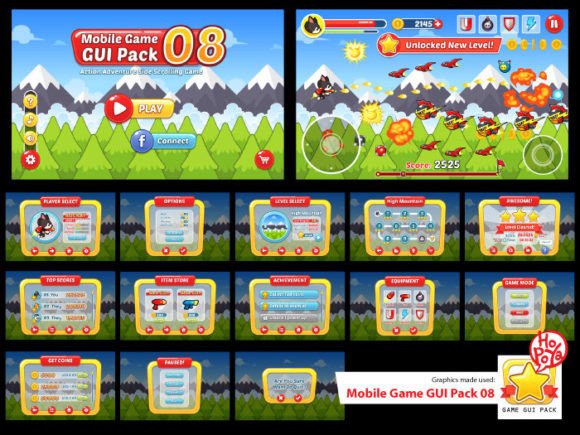
Creating a polished 2D mobile game often hinges on the quality of its user interface. The Mobile Game GUI Pack 08 is a comprehensive graphical user interface kit designed to give your project a professional and cohesive visual foundation right from the start. This pack provides a versatile collection of assets that streamline the design process, allowing developers to focus more on gameplay and less on crafting every single button and window from scratch.
At its core, this pack is built for flexibility and customization. It includes over 40 customizable buttons, each available in five distinct color variations. This variety ensures you can match the UI to your game's unique color palette and art style seamlessly. Beyond buttons, the collection features customizable windows and various game elements, providing the essential building blocks for menus, dialog boxes, health bars, and other interactive components. The inclusion of both vector AI and EPS10 files means you can scale every element to any size without losing quality, a critical feature for supporting the wide range of screen resolutions in today's mobile market.
Practical Applications for Game Developers and Designers
This resource is particularly valuable for indie developers, small studios, and designers working on 2D games across genres like puzzle, platformer, RPG, or casual games. It serves as an excellent starting point for prototyping, allowing you to implement a functional and visually appealing interface quickly. The transparent PNG files offer a drag-and-drop solution for rapid integration into game engines, while the vector files provide full editability for those who need to adjust shapes, colors, or details to achieve a perfect fit.
The choice of typeface within an interface is crucial for readability and personality. This pack utilizes the PoetsenOne font, a clean and friendly sans-serif typeface that enhances legibility on small screens. Its rounded characters contribute to a welcoming and modern feel, making it suitable for a wide array of game themes. When selecting a GUI pack, considering the included font is as important as the graphics themselves, as it directly impacts the user experience and the overall brand identity of your game.
Tips for Integrating and Customizing Your Assets
To make the most of a resource like this, consider the following practical advice:
- Test Readability: Always preview your UI elements on actual device screens to ensure text and icons are clear and tappable.
- Maintain Visual Consistency: Use the provided color variations to create a consistent visual language across all menus and in-game displays. This strengthens brand recognition and makes the game feel more cohesive.
- Edit with Purpose: While the assets are ready to use, don't hesitate to customize them. Adjusting corner radii, adding subtle shadows, or modifying gradients can help the GUI feel uniquely yours and better integrated with your game's specific art style.
Choosing the right design assets can significantly elevate the production value of your project. A well-structured GUI pack not only saves countless hours of design work but also ensures a level of polish that can make a game stand out in a crowded marketplace. It provides a framework for visual consistency, which is key to building a memorable player experience and a strong, professional presentation.
Ultimately, investing in high-quality design components is an investment in your game's first impression. The Mobile Game GUI Pack 08 offers a practical and flexible toolkit for bringing your 2D game's interface to life with clarity and style, helping you create a more engaging and professional product from the first screen to the last.